


wolf box dash camera
Experience crystal-clear 2.5K video with the E-YEEGER V100 dash cam. Featuring a Starvis sensor and six glass lenses, it captures stunning 2560x1440P resolution—70% more detail than standard 1080P.
Wide-Angle Lens & Night Vision The 160° wide-angle lens reduces blind spots and covers up to four traffic lanes. Super Night Vision and an F1.8 large aperture enhance low-light footage, increasing light intake by 30% for exceptional clarity at night.
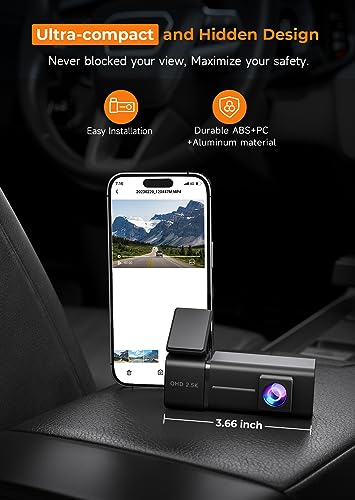
Compact and Durable Design Built to last, the V100 dash camera for cars is heat-resistant and made from aluminum alloy. It ensures reliability in extreme temperatures from -40°F to 185°F. The sleek and compact design doesn’t obstruct your view, enhancing safety. The robust build ensures durability against high temperatures and impact-related battery issues, keeping your recordings safe.
Reliable Loop Recording & G-Sensor With continuous loop recording, the V100 dash cam automatically overwrites the oldest footage when storage is full, ensuring uninterrupted recording. The built-in G-Sensor detects sudden movements or impacts and locks critical footage, preventing it from being overwritten. This ensures important moments are always securely saved.
App Connectivity & Wi-Fi Control Control and manage your recordings with ease through the E-YEEGER V100 dash camera app. View real-time footage, download videos, and adjust settings directly from your phone. Note that to maintain a stable connection, ensure the app has local network access and your VPN is off. CarPlay and Android Auto may interfere with the Wi-Fi connection.
Expandable Storage & Efficient Encoding The V100 comes with a 32GB SD card pre-installed and supports expansion up to 256GB. Using H.265 encoding, the camera saves up to 50% more memory space without compromising recording quality. For optimal performance, use a U1 or higher SD card.
24/7 Parking Mode & Time Lapse V100 offers continuous protection with 24-hour parking mode (requires optional Hardwire Kit, ASIN: B0D93LHW94). The time-lapse feature records at a low frame rate to conserve power while maintaining vigilance. Ensure the app has local network access permissions and turn off your device's VPN before connecting to Wi-Fi. CarPlay and Android Auto may interfere with the device’s connection, so please disconnect them from your phone.


 New
 New
 New
 New
